Elementor 4.4 fills two of the gaps I noted in 4.3: V4 finally gets a List element and a proper icon library. It also adds Agent Ready, which scores how easily AI agents can use a site, and another big batch of Elementor MCP abilities. Here’s what each one does, and what I’d actually use, up to the 4.4.1 patch. Everything here is from Elementor’s changelog and my own testing. Tested on Elementor 4.4, November 2026.
What’s new in Elementor 4.4?
Four new features and a long list of tweaks, most of them for V4 (atomic) sites and the MCP. If you’re new to V4, Elementor V4 and the atomic editor covers the basics first.
| Feature | V4 element? | My take |
|---|---|---|
| List | Yes | The one I’ve been waiting for. Icon lists in V4 at last |
| SVG Icon Library (Font Awesome 7) | Works with V4 | Makes icons in V4 far less fiddly |
| Agent Ready | Site-wide tool | Turn it on and look at the score |
| Google Maps | No | Needs a Google Maps API key |
| Accordion: open and closed icons, Selected state | Yes | Small, but it fixes real annoyances |
| Elementor MCP abilities | Works with the MCP | Good improvements across the board |
The List, the icons and the Accordion changes are all things you’ll touch on almost every V4 site. I’m adding V4 List, Icon and Carousel components to the Elementor V4 components in Element UI, the Elementor component library, and they’re coming soon.
How does the new List element work?
The List is an atomic element for lists with nested items and custom markers. For an icon list, there’s no separate widget: it’s the List element with an SVG element and a Paragraph inside each list item’s content. That’s very V4. Instead of one widget with a fixed layout and a long panel of settings, you get plain elements you can style, and you can put anything else in the item if the design needs it.
That matters more than it sounds. Feature lists, pricing plan checklists, contact details and footers all use icon lists, and until now V4 had no clean way to build one. This is why I’m building V4 List and Icon components next.
What is the SVG Icon Library?
It’s a built-in library of SVG icons, with Font Awesome 7 support. Before 4.4, getting an icon into a V4 page meant finding an SVG file and uploading it. Now you can pick one from the library.
The icons are SVGs, so they take color the same way as any SVG element. How to change an SVG icon color in Elementor V4 explains the Text color setting and why some SVGs won’t recolor.
What is Agent Ready, and should you turn it on?
Agent Ready is a new menu that prepares a site for AI agents: the ones that visit websites on behalf of people, not the kind that edit a site through the MCP. It scans the site and gives it a readiness score, then lists what to fix. Yes, turn it on. It’s free, it’s quick, and the score tells you something useful.
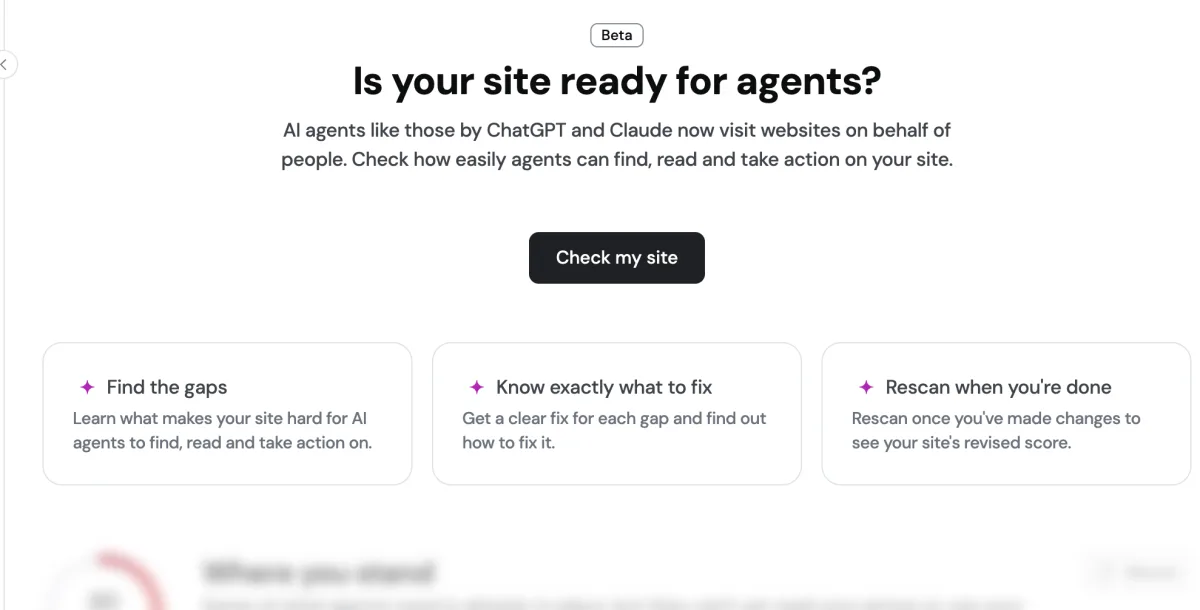
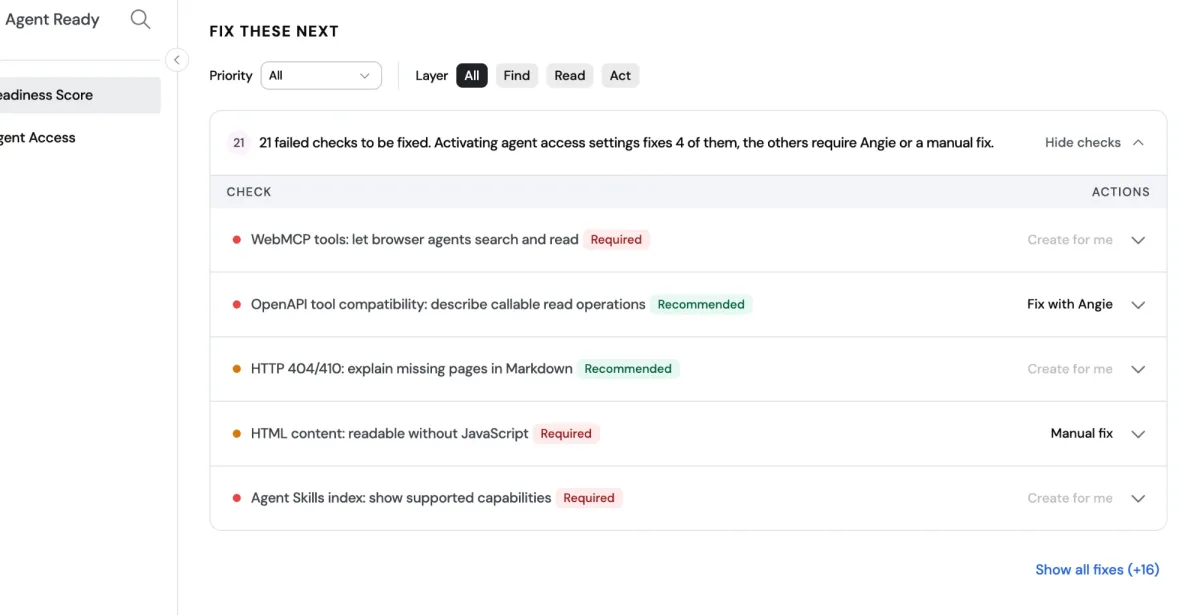
The score is out of 100, split across three layers: Find, Read and Act (Commerce is marked as coming soon). Under the score is a list of fixes, each marked Required or Recommended, with what you can do about it: some Elementor creates for you, some it offers to fix with Angie, its AI assistant, and some are a manual fix. On the site I scanned it found 21 failed checks, and switching on the agent access settings fixed 4 of them straight away.
Two things to keep in mind. It’s marked Beta, so expect it to change. And Elementor’s own Agent Ready Scanner says a higher score doesn’t guarantee anything: it doesn’t measure AI traffic or citations. Treat it as a checklist, not a ranking factor.
What’s new in the Elementor MCP in 4.4?
A lot, and they’re good improvements. In 4.4 the Elementor MCP reaches well beyond building atomic elements: it can work with legacy widgets, manage experiments and the cache, read system and license details, upload images and undo its own changes through revisions. Here is the full list from the changelog:
- Forms made through the MCP support WebMCP, so compatible AI agents can find and use them.
- More legacy widgets: Counter, Progress Bar, Social Icons, Image Gallery and Image Carousel.
- Rename elements in the Structure panel.
- View and switch Elementor experiments on or off.
- Clear the Elementor cache.
- Read System Info and license information.
- Upload images to the Media Library.
- Undo MCP changes using revisions.
Undo through revisions is the one I’d have wanted from day one: an AI tool making a bad change is much less scary when you can roll it back. The 4.4.1 patch also fixes MCP changes to published pages being lost or overwritten, so update before you lean on it.
What else changed in 4.4?
Elementor keeps fixing V4, and some of the smaller changes are the ones I notice most when building. The Accordion finally gets proper icon control and a Selected state, Atomic Forms can redirect after a submit, and Default Styles now travel with a site export. The rest are quality-of-life fixes:
- Accordion: separate open and closed icons, icon rotation you can change (in 4.3 an SVG icon always rotated), and Selected state styling, so the open item can look different. If you build FAQs, the Elementor FAQ and accordion templates are the place to start.
- Atomic Forms: a Redirect After Submit action sends visitors to a URL after a successful submission. It’s one I use often.
- Default Styles in import and export: website import and export now carries Default Styles. Elementor V4 Classes and Variables shows where they fit in a design system.
- Heading: a Span tag option.
- Content-only editing permissions for atomic elements.
- Controls: a cleaner interface for Image, Video and Background.
- Google Maps: a map element with address and zoom settings. It isn’t atomic and it needs a Google Maps API key.
- Fixes: responsive Dimensions settings that didn’t inherit across breakpoints, the color picker closing in the Variables Manager, and a broken Swiper source map that caused 404 errors.
4.4.1 (November 16) adds WordPress 7.2 compatibility and fixes security issues, anchor links scrolling to the wrong place on mobile on first load, MCP setup instructions failing in some environments, MCP updates to atomic elements failing on image validation, and the stability of Agent Ready.
Should you update to Elementor 4.4?
Yes, to 4.4.1. It has the security fixes and the MCP fixes, and nothing in 4.4 changes how existing pages render. As with any update, test it on a staging copy of a client site first.
| You’re running | My advice |
|---|---|
| A V3 site | Update for the fixes and the MCP’s legacy widget support |
| A V4 site | Update, then start using the List element and the icon library |
| Using the Elementor MCP | Update to 4.4.1 for the published page fix, and try undo through revisions |
| Curious about AI agents | Turn on Agent Ready, run the scan and work through the Required fixes |
What 4.4 didn’t bring is an atomic Carousel, which was on Elementor’s roadmap. For what came before, see what’s new in Elementor 4.3.
Frequently asked questions
When was Elementor 4.4 released?
Elementor 4.4.0 was released on November 9, 2026. The latest patch at the time of writing is 4.4.1, from November 16, 2026.
Is the Elementor 4.4 List element a V4 element?
Yes. The List is an atomic element. An icon list is the List with an SVG element and a Paragraph inside each list item, not a separate widget.
Does the Elementor 4.4 Google Maps element need an API key?
Yes, it needs a Google Maps API key. It also isn't an atomic (V4) element.
Did Elementor 4.4 add an atomic Carousel?
No. The 4.4.0 changelog has the List, the SVG Icon Library, Agent Ready and Google Maps, but no atomic Carousel.
Should I switch on Agent Ready?
I do. It scans the site, gives it a readiness score and lists what to fix. It's still in beta, and a higher score doesn't guarantee more AI traffic.